
Programmatic Access Guide
Guide to automating project management, API keys, yields, fees, and reports via the Programmatic API
Overview
This guide walks through every capability of the Yield.xyz Programmatic API. Use it to automate project provisioning, API key lifecycle, yield enablement, fee configuration, and reporting — all without touching the dashboard.
NoteFor background on what Programmatic Access is and when to use it, see the Programmatic Access documentation.
Prerequisites
Before you begin, you need a Programmatic Access API Key:
- Log in to the dashboard — Go to dashboard.yield.xyz
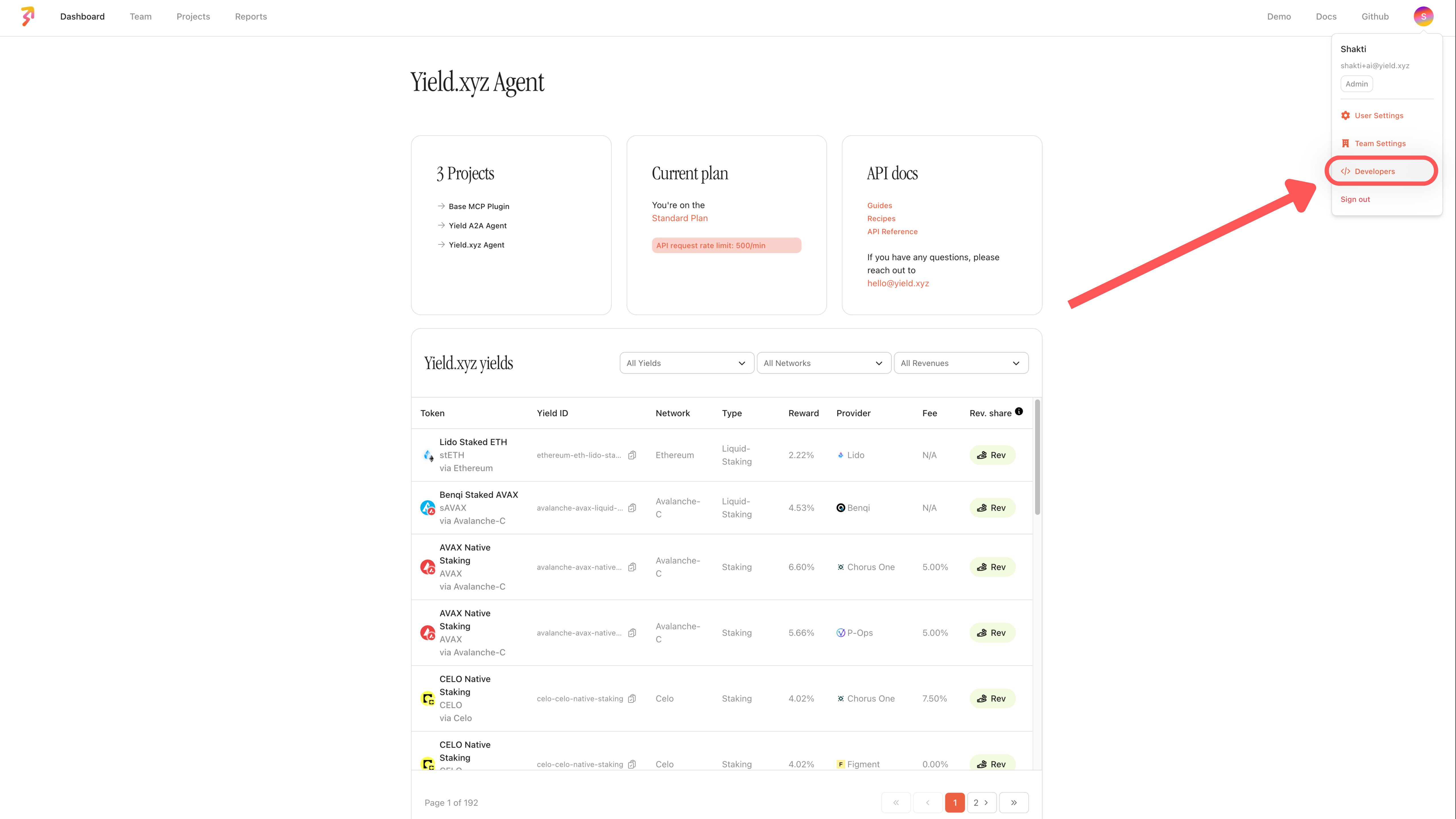
- Open the Developers section — Click your avatar (top-right) → Developers
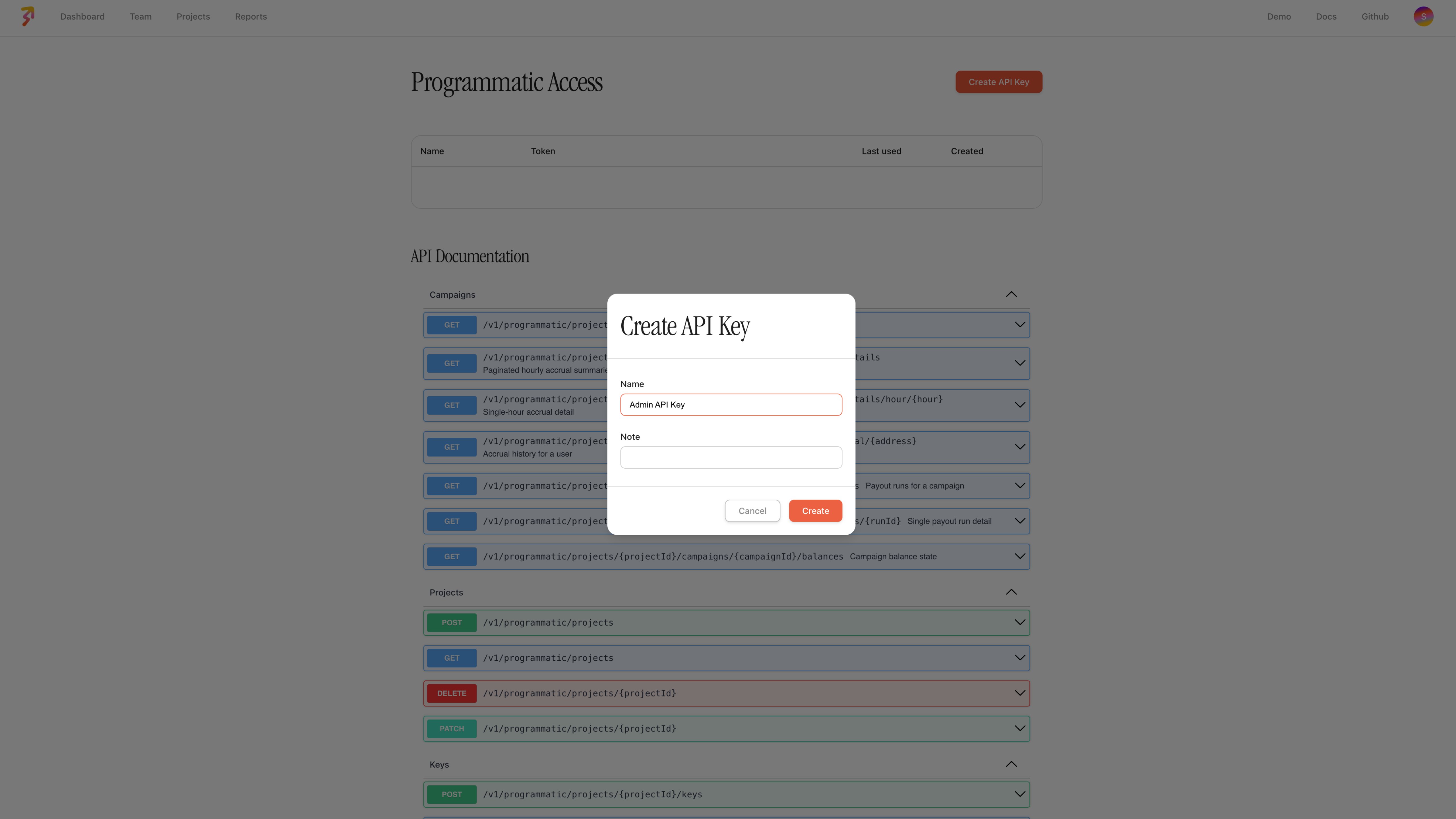
- Create an Admin API Key — Click Create API Key and store the key securely — it is only displayed once
All requests in this guide require the following header:
X-ADMIN-API-KEY: <your-admin-api-key>Base URL:
https://api.stakek.it
Projects
A project maps to a logical grouping — typically one per client, workspace, or environment. Each project has its own API keys, enabled yields, and fee configurations.
Create a Project
curl -X POST https://api.stakek.it/v1/programmatic/projects \
-H "X-ADMIN-API-KEY: <your-admin-api-key>" \
-H "Content-Type: application/json" \
-d '{
"name": "Acme Corp",
"description": "Production yield integration"
}'Response:
{
"id": "b1c2d3e4-...",
"name": "Acme Corp",
"description": "Production yield integration",
"teamId": "a1b2c3d4-...",
"autoComplaintBansEnabled": false,
"createdAt": "2026-03-05T10:00:00.000Z",
"updatedAt": "2026-03-05T10:00:00.000Z",
"deletedAt": null
}List Projects
curl https://api.stakek.it/v1/programmatic/projects \
-H "X-ADMIN-API-KEY: <your-admin-api-key>"Returns all projects belonging to your team.
Update a Project
curl -X PATCH https://api.stakek.it/v1/programmatic/projects/{projectId} \
-H "X-ADMIN-API-KEY: <your-admin-api-key>" \
-H "Content-Type: application/json" \
-d '{
"name": "Acme Corp (Updated)",
"autoComplaintBansEnabled": true
}'| Field | Type | Required | Description |
|---|---|---|---|
name | string | No | Updated project name |
description | string | No | Updated description |
autoComplaintBansEnabled | boolean | No | Enable/disable auto-ban on complaints |
Delete a Project
curl -X DELETE https://api.stakek.it/v1/programmatic/projects/{projectId} \
-H "X-ADMIN-API-KEY: <your-admin-api-key>"Soft-deletes the project and associated resources.
API Keys
API keys are scoped to a project. These are the keys your application passes to the Yield API (X-API-KEY header) for staking, balance, and action requests.
Create a Key
curl -X POST https://api.stakek.it/v1/programmatic/projects/{projectId}/keys \
-H "X-ADMIN-API-KEY: <your-admin-api-key>" \
-H "Content-Type: application/json" \
-d '{
"name": "Production Key",
"info": "Used by backend services"
}'Response:
{
"id": "k1e2y3...",
"apiKey": "sk_live_32refr-rwer231...",
"name": "Production Key",
"info": "Used by backend services",
"category": "default",
"projectId": "b1c2d3e4-...",
"lastUsedAt": null,
"createdAt": "2026-03-05T10:00:00.000Z",
"updatedAt": "2026-03-05T10:00:00.000Z",
"deletedAt": null
}
WarningThe
apiKeyvalue is only returned at creation time. Store it securely immediately — you will not be able to retrieve it again.
List Keys
curl https://api.stakek.it/v1/programmatic/projects/{projectId}/keys \
-H "X-ADMIN-API-KEY: <your-admin-api-key>"Update a Key
curl -X PATCH https://api.stakek.it/v1/programmatic/projects/{projectId}/keys/{keyId} \
-H "X-ADMIN-API-KEY: <your-admin-api-key>" \
-H "Content-Type: application/json" \
-d '{
"name": "Updated Key Name",
"info": "Updated metadata"
}'Delete a Key
curl -X DELETE https://api.stakek.it/v1/programmatic/projects/{projectId}/keys/{keyId} \
-H "X-ADMIN-API-KEY: <your-admin-api-key>"Soft-deletes the key. It will no longer authenticate Yield API requests.
Enabled Yields
Control which yield integrations are available for a project. An integration is a specific yield opportunity identified by an integrationId (e.g., ethereum-eth-lido-staking, optimism-usdt-aave-v3-lending).
List Enabled Yields
curl "https://api.stakek.it/v1/programmatic/projects/{projectId}/yields/enabled?page=1&limit=10" \
-H "X-ADMIN-API-KEY: <your-admin-api-key>"Response:
{
"data": [
{ "integrationId": "ethereum-eth-lido-staking" },
{ "integrationId": "optimism-usdt-aave-v3-lending" }
],
"hasNextPage": false,
"page": 1,
"limit": 10
}| Query Parameter | Type | Default | Description |
|---|---|---|---|
page | number | 1 | Page number |
limit | number | 10 | Items per page |
Enable Yields (Bulk)
curl -X POST https://api.stakek.it/v1/programmatic/projects/{projectId}/yields/enabled \
-H "X-ADMIN-API-KEY: <your-admin-api-key>" \
-H "Content-Type: application/json" \
-d '[
{ "integrationId": "ethereum-eth-lido-staking" },
{ "integrationId": "optimism-usdt-aave-v3-lending" },
{ "integrationId": "arbitrum-eth-aave-v3-lending" }
]'
TipYou can curate bundles of yield integrations (e.g., "Stablecoin Conservative", "Blue-chip DeFi") and enable an entire bundle in a single call by passing all the relevant
integrationIdvalues.
Disable a Single Yield
curl -X DELETE https://api.stakek.it/v1/programmatic/projects/{projectId}/yields/enabled/{integrationId} \
-H "X-ADMIN-API-KEY: <your-admin-api-key>"Disable Yields (Bulk)
curl -X DELETE https://api.stakek.it/v1/programmatic/projects/{projectId}/yields/enabled \
-H "X-ADMIN-API-KEY: <your-admin-api-key>" \
-H "Content-Type: application/json" \
-d '{
"integrationIds": [
"ethereum-eth-lido-staking",
"optimism-usdt-aave-v3-lending"
]
}'Fee Configuration
Configure fees on a per-integration basis within a project. Fees are expressed in basis points (bps), where 100 bps = 1%.
NoteApplying fees may require Yield.xyz to deploy onchain infrastructure (e.g., an OAV or fee wrapper). The fee configuration status reflects this lifecycle:
REQUESTED→PROCESSING→LIVE.
Create a Fee Configuration
curl -X POST https://api.stakek.it/v1/programmatic/projects/{projectId}/fee-configuration \
-H "X-ADMIN-API-KEY: <your-admin-api-key>" \
-H "Content-Type: application/json" \
-d '{
"integrationId": "optimism-usdt-aave-v3-lending",
"depositFeeBps": 50,
"performanceFeeBps": 1000
}'This configures a 0.5% deposit fee and 10% performance fee on the Aave USDT lending pool on Optimism.
Response:
{
"id": "fc1e2...",
"projectId": "b1c2d3e4-...",
"integrationId": "optimism-usdt-aave-v3-lending",
"depositFeeBps": 50,
"managementFeeBps": null,
"performanceFeeBps": 1000,
"allocatorVaultContractAddress": null,
"feeWrapperContractAddress": null,
"status": "REQUESTED"
}| Field | Type | Required | Description |
|---|---|---|---|
integrationId | string | Yes | Target yield integration |
depositFeeBps | number | No | Deposit fee in bps (1–10000) |
managementFeeBps | number | No | Management fee in bps (1–10000) |
performanceFeeBps | number | No | Performance fee in bps (1–10000) |
List Fee Configurations
curl "https://api.stakek.it/v1/programmatic/projects/{projectId}/fee-configuration?page=1&limit=10" \
-H "X-ADMIN-API-KEY: <your-admin-api-key>"Update a Fee Configuration
curl -X PATCH https://api.stakek.it/v1/programmatic/projects/{projectId}/fee-configuration/{feeConfigurationId} \
-H "X-ADMIN-API-KEY: <your-admin-api-key>" \
-H "Content-Type: application/json" \
-d '{
"performanceFeeBps": 500
}'Pass null for a fee field to remove it.
Delete a Fee Configuration
curl -X DELETE https://api.stakek.it/v1/programmatic/projects/{projectId}/fee-configuration/{feeConfigurationId} \
-H "X-ADMIN-API-KEY: <your-admin-api-key>"Reports
Pull transaction and staking activity across all projects belonging to your team. Use query parameters to filter and sort results.
List Report Entries
curl "https://api.stakek.it/v1/programmatic/report-entries?page=1&limit=10&sort=createdAtDesc" \
-H "X-ADMIN-API-KEY: <your-admin-api-key>"| Query Parameter | Type | Description |
|---|---|---|
projectId | string | Filter by project |
integrationId | string | Filter by yield integration |
walletAddress | string | Filter by wallet address |
validatorAddress | string | Filter by validator address |
status | string | Filter by action status (SUCCESS, FAILED, PROCESSING, etc.) |
type | string | Filter by action type (STAKE, UNSTAKE, CLAIM_REWARDS, etc.) |
sort | string | createdAtAsc or createdAtDesc |
page | number | Page number |
limit | number | Items per page |
Response:
{
"data": [
{
"address": {
"address": "0xabc..."
},
"action": {
"id": "act-123",
"integrationId": "ethereum-eth-lido-staking",
"type": "STAKE",
"status": "SUCCESS",
"amount": "1.5",
"USDAmount": "4500.00",
"createdAt": "2026-02-20T12:00:00.000Z",
"completedAt": "2026-02-20T12:05:00.000Z"
},
"metadata": {
"name": "Lido Staking",
"type": "liquid-staking"
}
}
],
"hasNextPage": true,
"page": 1,
"limit": 10
}Recommended Provisioning Flow
A typical integration follows this sequence when onboarding a new client or workspace:
- Create a project —
POST /v1/programmatic/projects— one project per client or workspace - Mint an API key —
POST /v1/programmatic/projects/{projectId}/keys— the key is used by the client or your backend to call the Yield API - Enable yields —
POST /v1/programmatic/projects/{projectId}/yields/enabled— enable a curated set of yield integrations - Configure fees (optional) —
POST /v1/programmatic/projects/{projectId}/fee-configuration— apply deposit, management, or performance fees - Monitor with reports —
GET /v1/programmatic/report-entries— pull activity data for reconciliation and analytics
Fee Configuration Lifecycle
When a fee configuration is created, it may go through several statuses before becoming active:
| Status | Description |
|---|---|
REQUESTED | Fee configuration has been submitted |
PROCESSING | Yield.xyz is deploying the required onchain infrastructure (OAV or fee wrapper) |
LIVE | Fee configuration is active and being applied |
CHANGES_REQUESTED | An update has been requested and is being processed |
Some fee configurations require Yield.xyz to deploy a dedicated Optimized Allocator Vault (OAV) or fee wrapper contract onchain. This is handled automatically — the
statusfield reflects the deployment progress.
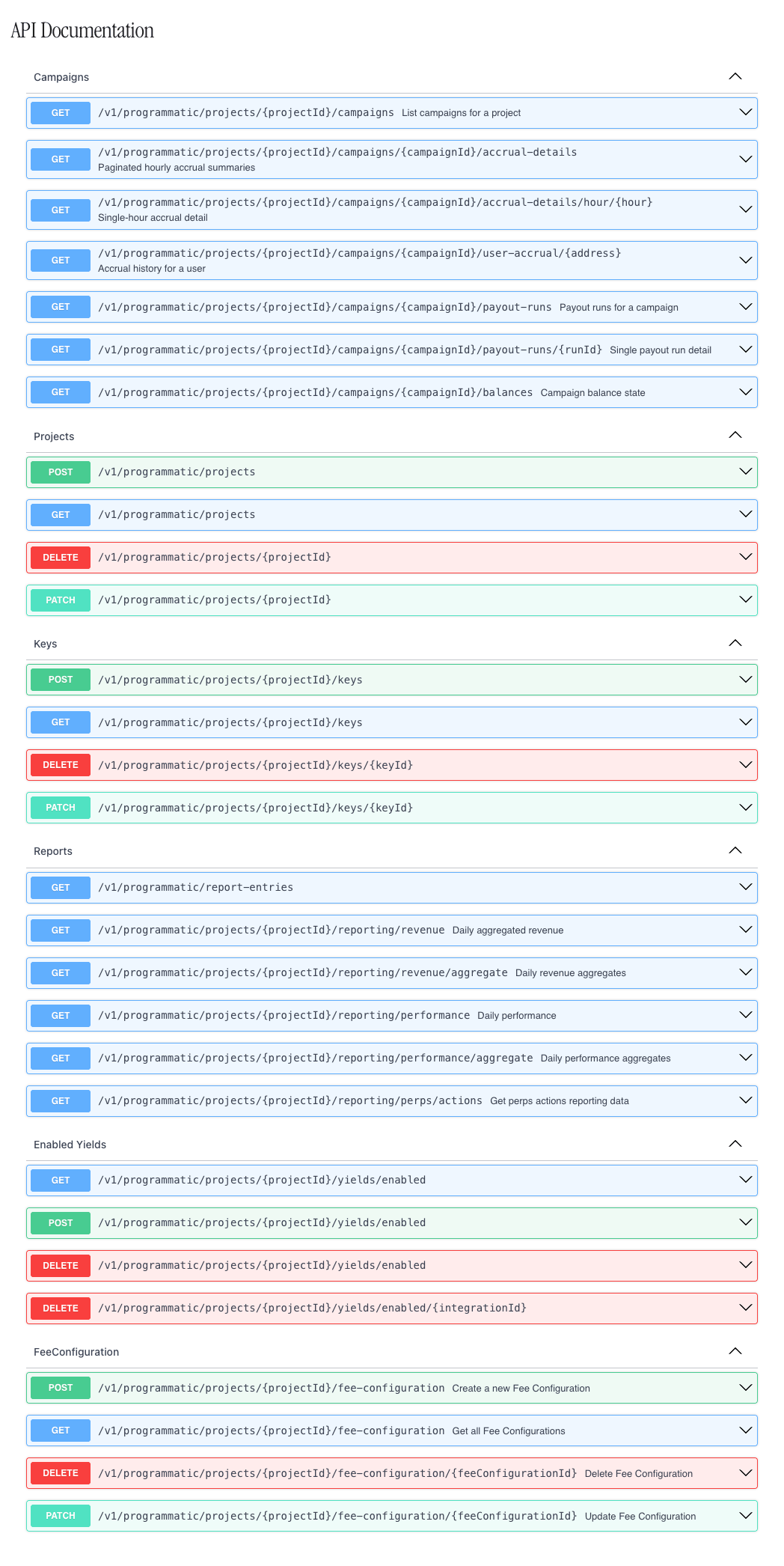
OpenAPI Specification
The full OpenAPI specification for the Programmatic API is available directly in the Yield.xyz dashboard:
- Log in to dashboard.yield.xyz
- Click your avatar → Developers
- The OpenAPI spec is displayed in the developer section
Updated 1 day ago