

@stakekit/widget integration. Zama confidential vaults keep each user’s deposit and balance encrypted on-chain. The widget handles the encryption, the wrap into the confidential token, reveal and hide, the daily batches and both withdraw modes.
There is no Zama prop to set. You update the widget to 0.0.294 or later, enable Zama yields on your project and, if your app manages the wallet, add one optional method to your wallet adapter. The vaults then appear in Earn next to your other yields for wallets on Ethereum, and on Ethereum Sepolia for the test vault. To build your own interface instead, see the Zama API guide.
At a glance
Prerequisites
- Zama yields enabled on your project. Enable them in the Yield.xyz dashboard, from your project’s enabled-yields list. If you do not have a project yet, set one up first.
- A funded test wallet with ETH for gas on Ethereum, or Sepolia ETH for the test vault. Deposits use a high gas limit, so keep more ETH than a usual vault deposit needs.
Update the widget
The method: signZamaPermit
If the widget connects the wallet, skip this section. Its built-in EVM wallets sign the Zama permit themselves.
If you pass your own wallet through externalProviders, add signZamaPermit to the provider. It signs the EIP-712 permit that lets the user decrypt their own confidential balances. Only the wallet owner can decrypt their amounts, so a reveal needs their signature. Zama’s guide to reading confidential balances explains the permit. Your Earn methods (signMessage, switchChain and sendTransaction) stay as they are, and every Zama transaction goes through sendTransaction like any other Earn transaction.
The method is optional, so the widget mounts without it, but Zama deposits are blocked. See Without signZamaPermit. Include Ethereum (1) in supportedChainIds, and Ethereum Sepolia (11155111) if you test on the Sepolia vault.
SKWallet, SKEip712TypedData, SKZamaPermitMeta and SKZamaPermitResult are exported from both @stakekit/widget and @stakekit/widget/bundle.
What the widget passes
typedData is a standard EIP-712 payload. Sign it as it is.
meta describes the permit for your signing prompt:
meta to label the request your users or approvers see, for example “Reveal your confidential balances”. The permit is a signature only. It moves no funds and sends no transaction.
Results
When the widget calls it
- Reveal. When the user taps Reveal on a confidential token balance, or “Reveal balance” or “Decrypt” on a position.
- Deposit from the confidential token. Before the deposit, the widget reveals the user’s confidential token balance to check the amount against it.
signZamaPermit before it starts. See Without signZamaPermit.
Example
This extends the provider from the Yield widget guide.yourWallet and isUserRejection are placeholders for your wallet SDK or custody provider. The signature must come from meta.address, the connected account.
Without signZamaPermit
If your provider has no signZamaPermit:
- Deposits are blocked. The “Encrypting your amount” step fails with “This request can’t be completed. Go back and change it.”, so the deposit transaction is never sent. The underlying error is
This wallet cannot reveal confidential balances. - Reveal is unavailable. Balances stay hidden, and the withdraw form, which needs the revealed share balance, stays behind “Decrypt”.
- Pending requests still work. The user can still cancel a pending deposit or withdrawal, and finish an instant withdrawal with “Complete withdrawal”. These need no permit.
Content Security Policy and bundlers
Zama encryption runs in a Web Worker so that it does not block the page.- Hosts built with webpack, Turbopack or Vite copy the worker script from the widget’s
distautomatically. The widget starts the worker from that copy after a same-originHEADrequest finds it, which needsconnect-src 'self'. - Otherwise, for example in Angular, with a CDN-hosted bundle or a cross-origin Next.js
assetPrefix, the widget starts a copy of the worker inlined into a lazy chunk, from ablob:URL. This needsworker-src blob:(ordata:). The inlined copy is about 5 MB and is downloaded only by hosts that do not serve the worker script. - If neither works, encryption runs on the page’s main thread. It still completes, but the page can be less responsive while it runs.
'self' to connect-src for the worker check, and blob: to worker-src if your host uses the inlined copy. Keep the entries your widget integration already needs.
What the user sees
Discover a vault
Zama vaults appear in Earn with their APY. The vault details say “When you deposit … you’ll receive … Your balance stays encrypted on-chain”, with the vault’s own tokens, and show the daily batch time and the withdraw modes: “Withdraw privately when the next batch settles, or instantly with a public amount”. The APY is the vault’s base rate. Zama runs its own incentives, which need a separate opt-in in the Zama app. The vault details link to it: “See incentives and delegation options for this vault on Zama. Learn more”. The widget does not opt users in.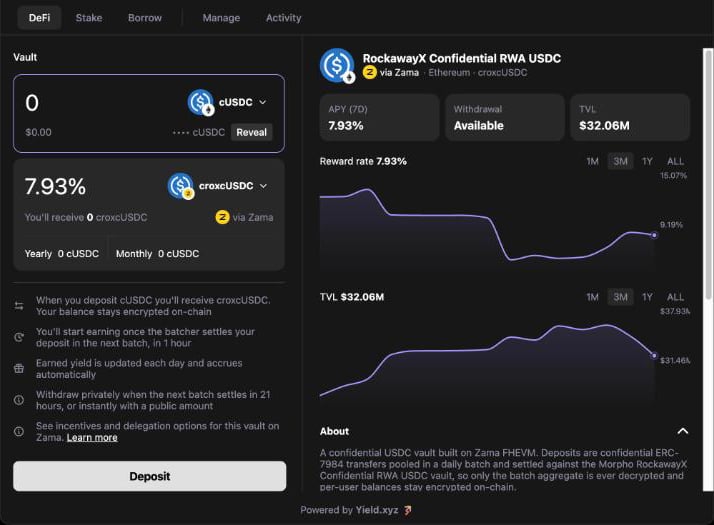
A Zama vault in Earn, with cUSDC as the input token and its balance masked
Deposit from the plain token
The user picks a vault and enters an amount of USDC, USDT, WBTC or AUSD. The widget then runs these steps, each shown as its own row:Encrypting your amount
RESET APPROVAL and APPROVAL (when needed)
- The allowance already covers the amount: no approval.
- The allowance is zero: “APPROVAL”.
- The allowance is above zero but too small, or cannot be read: “RESET APPROVAL” to zero first, then “APPROVAL”. Tokens such as USDT revert when one non-zero allowance changes to another.
WRAP
DEPOSIT
Deposit submitted
Deposit from the confidential token
If the user already holds the confidential token (for example cUSDC), they can pick it as the input token. Its balance shows masked, with a Reveal button. Reveal asks for the permit signature and shows the amount, with Hide to mask it again. The deposit skips the approve and wrap. When the user confirms, the widget reveals the confidential balance and checks the amount against it, then encrypts the amount and sends the deposit.Manage
- Hidden amounts. Confidential positions show “Hidden” in the positions list, even after a reveal. The Manage totals leave them out: “Totals exclude confidential positions, whose amounts stay private.”
- Reveal and Hide. In position details, “Reveal balance” asks for the permit signature and shows the amounts. “Hide balance” masks them again.
- Pending deposit or withdrawal. A request waiting for its batch shows “In progress” in the positions list, and “Pending deposit” or “Pending withdrawal” in the position details, with ”… remaining” next to the entering or exiting balance when the batch time is known.
- Cancel. A pending request has “Cancel deposit” or “Cancel withdrawal”. The widget explains: “Cancelling returns everything you have in this batch as cUSDC, right away” (or the vault share token for a withdrawal). The cancel returns the whole amount that wallet has in that batch.
- In flight. While a cancel is broadcast and not yet confirmed, the row shows “Cancelling…” in place of the cancel action.
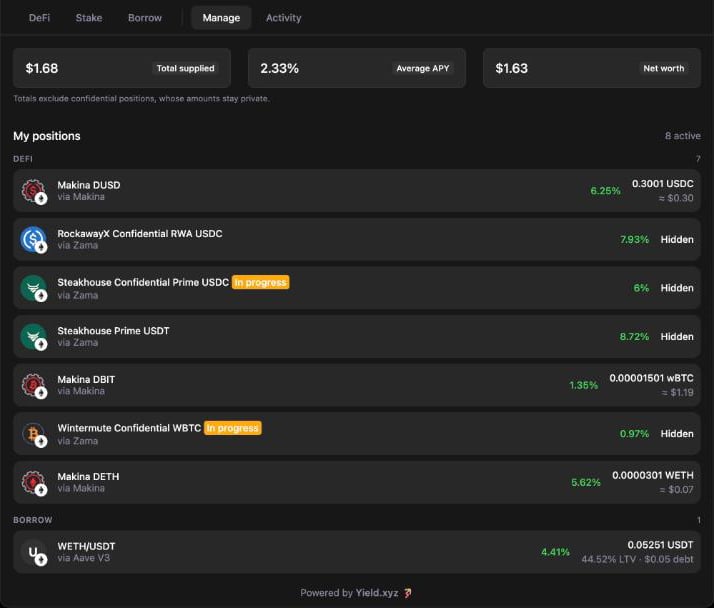
Zama positions show Hidden amounts, and a request waiting for its batch shows In progress
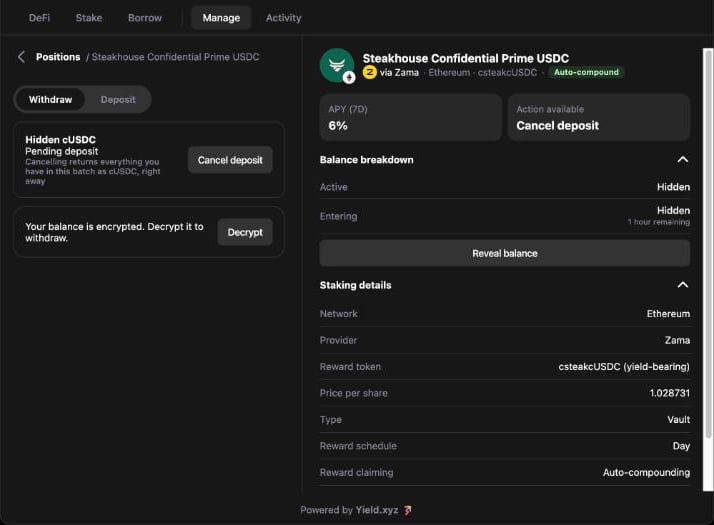
A pending deposit with Cancel deposit, and the encrypted balance waiting to be decrypted
Withdraw
The withdraw form shows “Your balance is encrypted. Decrypt it to withdraw.” until the user taps “Decrypt” and signs the permit. The user then enters an amount in vault shares (for example csteakcUSDC), with the approximate underlying value shown below, and picks the receive token:Positions in other vaults
To keep the chosen vault private, every deposit and every private withdrawal also sends an encrypted zero to each other Zama vault for the same asset. Those vaults can then show a position marked “Hidden”, like any other encrypted position. Once the user reveals their balances, a position that holds zero drops out of the list. This is expected and needs no action. Zama’s confidentiality page lists what stays private and what is public on-chain.Where revealed amounts live
Revealed amounts are held in memory only, never in browser storage. They clear when the user taps Hide, when the connected account changes, after a transaction, and when the page reloads.Testing
- Update to 0.0.294 or later and enable Zama yields on your dev project.
- If you pass your own wallet, add
signZamaPermit, and add11155111tosupportedChainIds. - Connect a test wallet on Ethereum Sepolia with Sepolia ETH and test USDC, and open the test vault (
ethereum-sepolia-usdc-zama-steakhouse-usdc-confidential-vault). - Deposit a small amount from USDC. Check “Encrypting your amount”, then the approval and “WRAP” rows and the deposit, then the “Deposit … submitted” screen with the next batch time.
- Open the position. Check that it shows “Hidden”, that “Reveal balance” asks for one signature and shows the amount, and that “Hide balance” masks it.
- Cancel the pending deposit. Check that “Cancelling…” shows while the cancel is in flight and that the cUSDC returns to the wallet.
- Deposit again, wait for the batch to settle, then make one private and one instant withdrawal.
- Repeat a small deposit and withdrawal on an Ethereum mainnet vault before you go live.
{ type: "cancelled" } and leaves the balance hidden, that meta.contracts and meta.chainId look right in your signing prompt, and that a provider without signZamaPermit blocks the deposit as described above.
Troubleshooting
Each entry is titled with the message the user sees, or with the symptom when there is no message.Configuration
Zama vaults do not appear
Zama vaults do not appear
supportedChainIds. Check that npm ls @stakekit/widget shows 0.0.294 or later.Signing
This request can't be completed. Go back and change it.
This request can't be completed. Go back and change it.
signZamaPermit (This wallet cannot reveal confidential balances.). Add the method and keep it on every rerender. For a deposit from the confidential token, it can also mean the amount is larger than the confidential balance (Amount exceeds the confidential balance.). Go back and lower the amount.Could not reveal the balance. Try again.
Could not reveal the balance. Try again.
signZamaPermit signs with meta.address, the connected account, and that it returns { type: "success", signature }.Encryption and the worker
Encryption failed. Retry to try again.
Encryption failed. Retry to try again.
The page freezes during Encrypting your amount
The page freezes during Encrypting your amount
worker-src blob:, so it runs in a worker.The deposit fails for gas
The deposit fails for gas
Balances
The position still shows right after a cancel
The position still shows right after a cancel
A pending request has no next batch time
A pending request has no next batch time
Withdraw shows Decrypt instead of an amount
Withdraw shows Decrypt instead of an amount
signZamaPermit.FAQ
When does a deposit start earning?
When does a deposit start earning?
Can a user cancel part of a pending request?
Can a user cancel part of a pending request?
Why does a pending deposit include money deposited in the Zama app?
Why does a pending deposit include money deposited in the Zama app?
Do we need a Zama API key?
Do we need a Zama API key?