

Earn API
Integrate staking, DeFi, stablecoin yield, and tokenized RWAs.
Trade: Perps API
Open and manage perpetual futures positions on Hyperliquid.
Borrow API
Supply collateral, borrow assets, repay loans, and manage lending positions.
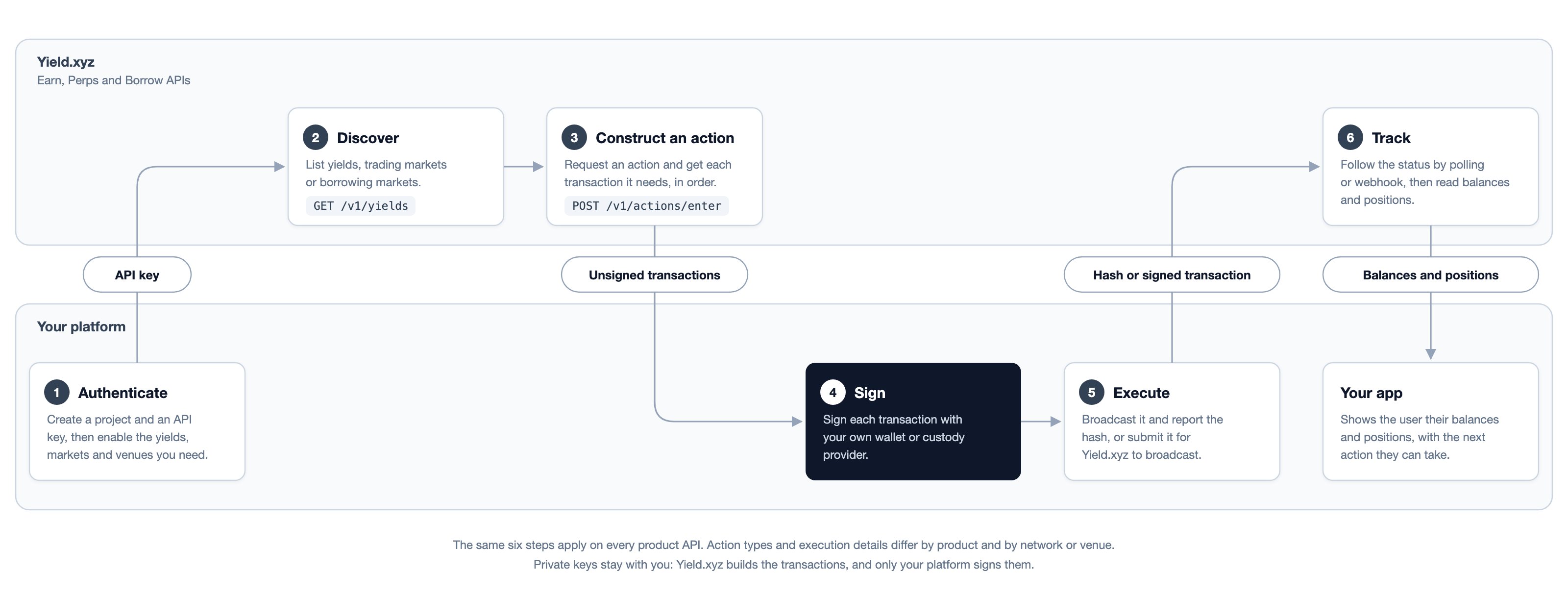
Yield.xyz builds every transaction and returns it unsigned, as transaction data or a signable payload. Your application, wallet or custody provider signs it, then either broadcasts it or returns it for Yield.xyz to submit. Yield.xyz never holds user funds or private keys.
Before you start
Create a team and project in the Yield.xyz dashboard, then generate an API key. Include the key in thex-api-key header when making requests to the APIs.
Your project determines which products and opportunities are available to your integration. Some capabilities, including Borrow and certain trading integrations, may require access to be enabled for your team.
Trade is live today through the Perps API, for perpetual futures on Hyperliquid. The Trade API, coming soon, replaces it with
buy, sell and manage across perps, spot, prediction markets and tokenized stocks. See Trade.Earn API
The Earn API provides access to 4,000+ yield opportunities across 85+ networks, including staking, DeFi, stablecoin strategies, and tokenized real-world assets. The integration follows a consistent lifecycle: discover an opportunity, inspect its requirements, construct an action, sign and submit the transactions, and track the resulting position.1
Discover available yields
Use See Discover for available filters and discovery options.
GET /v1/yields to retrieve the opportunities enabled for your project. You can filter the results by network, token, provider, or yield type, depending on the available query parameters.Each opportunity has a unique id, which is used when requesting actions and retrieving position information.GET /v1/yields returns opportunities enabled for your project. Enable additional yields in the dashboard before attempting to discover or integrate them.2
Inspect the required arguments
Fetch the selected opportunity using Always inspect the opportunity’s metadata rather than assuming the same arguments apply to every yield.See Yield metadata for the complete schema.
GET /v1/yields/{yieldId}.The response includes mechanics.arguments.enter.fields, which describes the inputs required to construct an enter action. These requirements can differ between opportunities.For example, an ETH staking opportunity may require an amount, while validator-based staking can require additional information such as validatorAddress.cURL
Response (truncated)
3
Construct an enter action
Call Some opportunities require multiple transactions, such as token approvals followed by a deposit. Execute the transactions in the order returned by the API.See Actions for supported action types and transaction handling.
POST /v1/actions/enter with the selected yieldId, the user’s wallet address, and the required arguments.The response contains an action with an ordered transactions array. Each transaction includes the unsigned transaction data required for execution.4
Sign, submit, and track transactions
Pass each The transaction status is updated as execution progresses. Track the action until the required transactions reach a terminal state, such as
unsignedTransaction to your application’s signer, which can be an EOA, smart account, MPC wallet, or institutional custody provider.Once a transaction has been signed and broadcast, report its hash using PUT /v1/transactions/{transactionId}/submit-hash.cURL
SUCCESS or FAILED.Reporting a transaction hash allows Yield.xyz to track execution. It does not replace broadcasting the signed transaction through your wallet or transaction provider.
5
Retrieve the resulting position
After execution, use Position data can include lifecycle states such as
POST /v1/yields/{yieldId}/balances to retrieve the user’s position.cURL
active, entering, exiting, withdrawable, claimable, and locked.Some positions also expose pendingActions, including reward claims or withdrawal-related actions. These can be handled through the corresponding manage flow using POST /v1/actions/manage.See Balances and positions for lifecycle states, pending actions, and position management.Perps API
The Perps API lets applications offer perpetual futures trading on Hyperliquid without integrating the venue directly. The API returns markets, builds trading actions for you to sign, submits the signed orders to the venue and tracks positions. The following example opens a leveraged position on Hyperliquid.1
Discover trading markets
Use Select a market and retain its
GET /v1/markets to retrieve available markets. Filter by providerId to select a supported trading venue.Market information includes identifiers, leverage limits, trading fees, funding rates, and minimum position requirements.cURL
id for the trading action.2
Construct a trading action
Use In this example,
POST /v1/actions to construct an order.The request includes the trading venue, wallet address, action type, and market-specific arguments.To open a position, provide the market, direction, margin or position size, and leverage.cURL
amount represents the margin in USD, while leverage determines the corresponding position notional.You can alternatively provide size to specify the position size in USD. The position notional must meet the venue’s minimum requirement, which is at least 10 USD for the example described here.The trading account must have sufficient available margin before opening a position. If funding is required, use the supported
fund action before submitting the order.3
Sign and submit the transaction
The action response contains transactions with a Yield.xyz submits the signed payload to the supported trading venue.
signingFormat and signablePayload.Trading actions may use typed-data signing, such as EIP712_TYPED_DATA, rather than a standard unsigned blockchain transaction.Sign the returned payload using your wallet or signing provider, then submit the signature through POST /v1/transactions/{transactionId}/submit.cURL
4
Track open positions
Use Position data can be used to display open positions, unrealized PnL, and other available trading information.The same API also supports additional trading actions for managing positions, subject to the capabilities of the selected venue.
POST /v1/positions to retrieve positions associated with the user’s wallet and trading venue.cURL
Borrow API
The Borrow API lets users borrow against their crypto across Aave V3, SparkLend, Morpho Blue and Lista, with Compound V3 being added. Every market is returned in the same shape. You can discover lending markets, supply assets, enable collateral where required, borrow, repay and withdraw through the same action model.1
Discover lending markets
Use Select the appropriate market based on the user’s collateral asset, borrowing requirements, and available market information.
GET /v1/markets to retrieve supported lending markets.Markets can be filtered by network or integration, and each result includes an id and the integrationId identifying the underlying protocol integration.cURL
2
Construct a lending action
Call Some markets require additional arguments. For example, pooled lending markets such as Aave and SparkLend may require a
POST /v1/actions with the market’s integrationId, the user’s address, the requested action, and its arguments.Supported actions include:The example below constructs a supply action.
cURL
tokenAddress to identify the asset.enableCollateral and disableCollateral apply to supported pooled markets.3
Sign and submit transactions
The action response contains transactions with a Alternatively, you can provide
signingFormat and signablePayload.Sign and submit the transactions one at a time, in the order returned, using POST /v1/transactions/{transactionId}/submit. Before you submit the next one, poll GET /v1/actions/{id} until the previous transaction is CONFIRMED: a SUPPLY submitted before its APPROVAL confirms reverts.If you have already broadcast the transaction, provide its hash:cURL
signedPayload and let Yield.xyz broadcast the signed transaction.An action can return several transactions, for example an APPROVAL before a SUPPLY. Submit them in order, and wait for each one to confirm before you submit the next. Every transaction comes back in the first response: Borrow actions return hasNextStep: false, so there is no next step to request.4
Retrieve the borrowing position
Use The returned position data can be used to display supplied collateral, outstanding debt, borrowing rates, and available position health information.Continue monitoring the position as users borrow, repay, or withdraw assets.
GET /v1/positions with the user’s wallet address, network, and protocol integration.cURL
Before you go live
Before making your integration available to users, verify that your project configuration, transaction handling, and security controls are ready.
For additional transaction protection, use Shield, which checks each transaction against the pattern expected for it before you sign.
Next steps
Once you’ve completed your first API request, explore the guides and references for the product you’re integrating. You can also build with AI development tools and AgentKit.Earn
Explore yield discovery, transaction actions, balances, and position management.
Trade
Build perpetual futures trading, funding, and position management flows.
Borrow
Integrate lending markets, collateral management, and borrowing actions.
Build with AI
Use AI coding assistants, the MCP server, and AgentKit to build integrations.