> ## Documentation Index
> Fetch the complete documentation index at: https://docs.yield.xyz/llms.txt
> Use this file to discover all available pages before exploring further.
# Shield
> Shield is a zero-trust validation layer: it checks unsigned transactions against their verified pattern, including the target contract, receiver, spender and calldata, before they are signed. It runs in your own app and inside the Earn API as Defense Mode.
You keep your keys and sign every transaction yourself. Before you do, Shield checks the transactions Yield.xyz builds against their verified pattern, down to the target contract, the receiver, the spender and the calldata. Shield is open source, so you can audit exactly what it checks.
Yield.xyz recommends running Shield in your own app or backend for a zero-trust setup. It treats every unsigned transaction as untrusted, including the ones the Earn API builds, so you present a transaction for signing only once it passes. A small modification to a transaction can redirect funds to an attacker's address, trigger unintended contract calls or drain token approvals, and Shield catches it before anything is signed. [Defense Mode](/documentation/security/shield/index#defense-mode) runs the same checks inside the Earn API as a second layer.
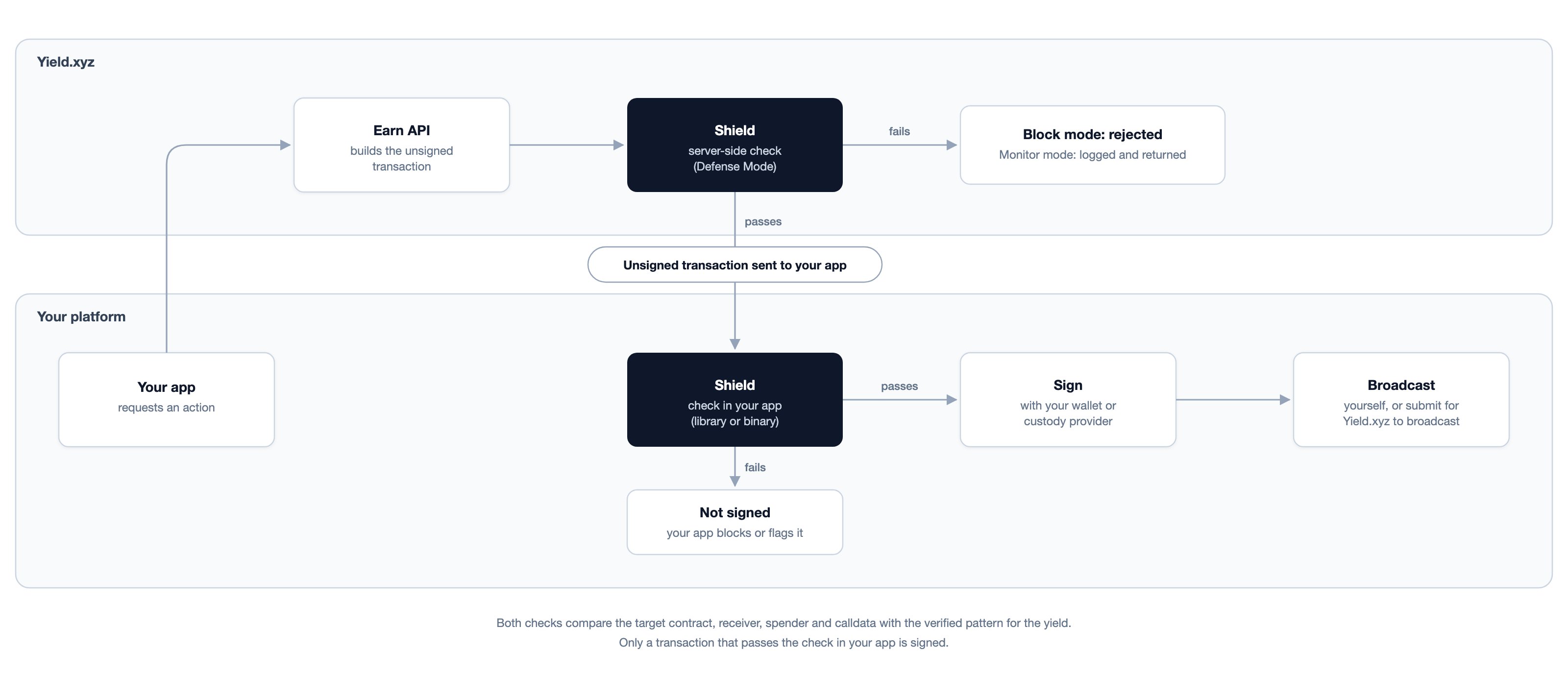
Shield sits between transaction construction and signing: the Earn API builds an unsigned transaction, Shield validates it against the yield's verified pattern, and only then do you sign. It decodes each transaction into a typed structure (ABI decoding for EVM, instruction parsing for Solana, TronWeb decoding for Tron), validates each decoded field against a verified template for the specified yield integration, and re-encodes EVM calldata to detect byte-level tampering. Anything that deviates from the verified pattern fails validation.
Source code, issues, and release artifacts at stakekit/shield
TypeScript library: @yieldxyz/shield
## What Shield checks
| Check | What it verifies |
| - | - |
| Transaction type | Detects deposit, withdrawal, approval, wrap, unwrap, stake, swap or claim from the function selector and target contract |
| Target contract | `to` must be a whitelisted address: an embedded vault registry for ERC-4626 vaults, fixed addresses for Lido and Rocket Pool |
| Parameters | Receiver, owner and spender must match the user's address, or an explicitly declared `args.receiverAddress` for custodial flows |
| Tampering | Decoded EVM calldata is re-encoded and compared byte for byte, so appended or altered bytes are flagged |
| Chain scope | Vaults are keyed by `chainId:address`, so an address valid on one chain is not accepted on another |
Shield covers EVM, Solana and Tron transactions for the yields it has validators for, including more than 1,600 ERC-4626 vaults across 18 networks. Check coverage per yield with `isSupported(yieldId)` or list it with `getSupportedYieldIds()`; see [Shield features](/documentation/security/shield/features) for the validator matrix. In the client library, unsupported or unrecognized transactions fail validation rather than passing; server-side, yields without a validator are currently skipped.
## Where it runs
| Where | How | Page |
| - | - | - |
| Your client or backend | The `@yieldxyz/shield` TypeScript library, or standalone binaries that take the same request as JSON over stdin (Go, Python and Rust guides) | [Integration](/documentation/security/shield/integration) |
| Inside the Earn API | Defense Mode: server-side validation before the transaction is returned. It runs in Monitor (validate and log) by default, and a project can be set to Block, which rejects failed transactions with an error | [Defense Mode](/documentation/security/shield/index#defense-mode) |
Client-side and server-side Shield check different things: client-side validation covers the path from the API to your signing flow, server-side validation covers the API itself. They can run together.
 ## Defense Mode
Defense Mode is Shield running inside the Earn API's transaction pipeline, so every unsigned transaction the API builds for a supported yield is validated before it is returned. In **Monitor** mode, the default, a failed validation is logged and the transaction is returned as normal. In **Block** mode, the transaction is rejected and you receive an error instead. Yield.xyz enables Block for a project after a Monitor period on live traffic. Yields without a registered validator are currently skipped server-side rather than blocked.
Defense Mode needs no changes to your integration code. In Block mode, a rejected transaction returns **HTTP 500** with the message `Transaction blocked by security validation`. The detailed reason is logged server-side and not returned, so Shield's logic can't be probed through error messages. If you believe a block is incorrect, contact Yield.xyz with the request timestamp and your project.
### What each layer covers
| Threat | Covered by Defense Mode | Notes |
| - | - | - |
| Transaction construction altered inside the API (compromised code or dependency) | Yes, in Block mode | Shield validates the constructed transaction independently of the code that built it. Shield currently runs in-process, so a full compromise of the API runtime is not covered |
| Response altered between the API and your client | No | Covered by client-side Shield |
| Client modifies a transaction after receiving it | No | Client-side Shield and wallet confirmation |
| Protocol-level exploit in a contract Shield approves | No | Shield checks transaction structure, not the safety of the underlying protocol |
| Gas parameters (`maxFeePerGas`, `gasLimit`) | No | Not validated today |
| Amount changed from what the user intended | Only when an intended amount is declared | Declare `args.amount` or `args.shareAmount` when calling Shield client-side |
| Phishing or a user approving an unwanted transaction | No | Wallet-level confirmation |
## The call
```typescript theme={null}
import { Shield } from '@yieldxyz/shield';
const result = new Shield().validate({ unsignedTransaction, yieldId, userAddress });
if (!result.isValid) throw new Error(result.reason);
```
`validate` returns `isValid`, a human-readable `reason` when it fails, optional `details`, and the `detectedType` it identified. Your integration decides what to do with a failure: block signing, warn the user, or log it for review.
## Why zero trust
Every step between building a transaction and signing it is a point where the transaction could be altered. An attacker who changed an API response could, for example, point a deposit at their own address, and the transaction would still be a valid ERC-4626 call that executes on-chain. Shield checks each transaction independently of the system that built it, so a tampered transaction fails validation before anyone signs it.
## Next steps
How Shield fits into the wider security suite
Coverage matrix, validators, decoding, and validation errors
TypeScript library, standalone binaries, and Go/Python/Rust guides
This documentation is built and hosted on [Mintlify](https://mintlify.com), a developer documentation platform.
## Defense Mode
Defense Mode is Shield running inside the Earn API's transaction pipeline, so every unsigned transaction the API builds for a supported yield is validated before it is returned. In **Monitor** mode, the default, a failed validation is logged and the transaction is returned as normal. In **Block** mode, the transaction is rejected and you receive an error instead. Yield.xyz enables Block for a project after a Monitor period on live traffic. Yields without a registered validator are currently skipped server-side rather than blocked.
Defense Mode needs no changes to your integration code. In Block mode, a rejected transaction returns **HTTP 500** with the message `Transaction blocked by security validation`. The detailed reason is logged server-side and not returned, so Shield's logic can't be probed through error messages. If you believe a block is incorrect, contact Yield.xyz with the request timestamp and your project.
### What each layer covers
| Threat | Covered by Defense Mode | Notes |
| - | - | - |
| Transaction construction altered inside the API (compromised code or dependency) | Yes, in Block mode | Shield validates the constructed transaction independently of the code that built it. Shield currently runs in-process, so a full compromise of the API runtime is not covered |
| Response altered between the API and your client | No | Covered by client-side Shield |
| Client modifies a transaction after receiving it | No | Client-side Shield and wallet confirmation |
| Protocol-level exploit in a contract Shield approves | No | Shield checks transaction structure, not the safety of the underlying protocol |
| Gas parameters (`maxFeePerGas`, `gasLimit`) | No | Not validated today |
| Amount changed from what the user intended | Only when an intended amount is declared | Declare `args.amount` or `args.shareAmount` when calling Shield client-side |
| Phishing or a user approving an unwanted transaction | No | Wallet-level confirmation |
## The call
```typescript theme={null}
import { Shield } from '@yieldxyz/shield';
const result = new Shield().validate({ unsignedTransaction, yieldId, userAddress });
if (!result.isValid) throw new Error(result.reason);
```
`validate` returns `isValid`, a human-readable `reason` when it fails, optional `details`, and the `detectedType` it identified. Your integration decides what to do with a failure: block signing, warn the user, or log it for review.
## Why zero trust
Every step between building a transaction and signing it is a point where the transaction could be altered. An attacker who changed an API response could, for example, point a deposit at their own address, and the transaction would still be a valid ERC-4626 call that executes on-chain. Shield checks each transaction independently of the system that built it, so a tampered transaction fails validation before anyone signs it.
## Next steps
How Shield fits into the wider security suite
Coverage matrix, validators, decoding, and validation errors
TypeScript library, standalone binaries, and Go/Python/Rust guides
This documentation is built and hosted on [Mintlify](https://mintlify.com), a developer documentation platform.